The Church (Office) Has Left The Building
Jeff here. Sunday March 15th, 2020 was the beginning of a culture shift for Church Online. Life.church is guesstimating that 2500+ churches streamed for…
The Church (Office) Has Left The Building
Jeff here. Sunday March 15th, 2020 was the beginning of a culture shift for Church Online. Life.church is guesstimating that 2500+ churches streamed for the first time to their Church Online Platform. Even more I’m sure hit social media. (I’m on the phone with Hallmark to make March 15th officially becomes Church Online Appreciation Day!) But we do know this. Church is more than just Sunday. And with gathering even impacting Church Office workspace, what are we to do.
Enter Philip Paul. I’ve met, demoed, and worked with Philip’s team as they’ve developed this Hub365 software, and truthfully I’m excited about it’s implications for the church… more than ever as Church Staff are now moving to Virtual Office.
Thanks Philip, for helping with this blog here at THECHURCH.DIGITAL.
Building is closed. Church is open.
You just announced to the congregation that due to the pandemic situation and guidance from the local government, your church will not be having regular Sunday in-person services. You pointed them to the Online Streaming website for the service broadcast. Now what!?
As churches respond to pandemic outbreaks and mandatory in-person closures, there is a need to understand the various options that are available to engage with the staff, ministries and congregation remotely. While there are many options that are available for churches, sometimes the options can look overwhelming. In addition, a number of the staff, ministries and groups may already be using various methods to communicate. What do you do as a church?
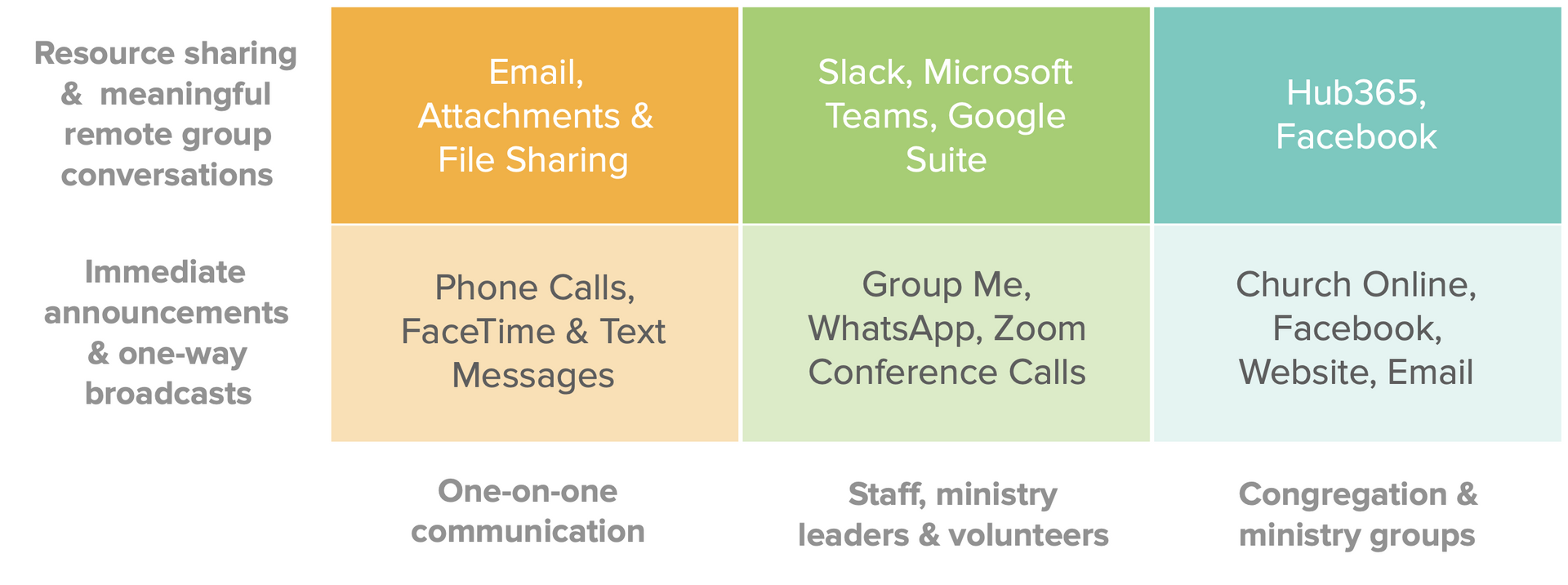
This guide is a quick one that has been put together for churches to understand the various options and pick what suits their church environment. In general, there are 6 categories of tools and options available to churches. There are link to the tools below so that you can easily review them and see if they fit your needs.
As with any task, the best tool depends on the job to be done. So, let’s walk through the categories and tools and look at the pros/cons for each of them.
One-on-one Communication
This is an easy category to describe as it really focuses on simple one-on-one communication tools that most of us are familiar with. Phone calls and text messages and
calls are best for communication or conversations that have a need for an immediate response.
If the need is to have secure conversations and the ability to discuss and share resources, email,
and
could be good options for the one-on-one communication category.
Staff and Ministry Leaders
This is an interesting category as the need here is to communicate to a group of people; a sta
ff
team, ministry leaders or volunteers. There are a number of tools that can help with broadcasting messages and most teams already use a combination of these tools. While texting is a common way,
(a product from Facebook)
and
work well for these immediate and sometimes disjointed conversations.
If the need is to have discussions and share resources within multiple groups,
,
and
will work well. Documents can be shared easily and groups can be created as well and administered at an enterprise level.
Congregation and Ministry Groups
This is an emerging category especially in light of churches needing to engage with communications in environments where people are not present in a face to face environment. Since the congregation is being engaged, the tools have to be ‘insanely simple’ and easy to use.
On the immediate broadcasting need, the best tools may your church E-mail (if you have an e- mail list) and Facebook (if you have already built up a following).